
Scada & Monitoring Software
Real-Time, Intelligent & Comprehensive
Integrated. Powerful. Secure. Simple.
From the factory floor and industrial environments to the highest levels of automation, digital transformation can be smart, secure, cost-effective, flexible, and seamless—with no limitations. Capture and connect your data flow across your entire automation infrastructure.
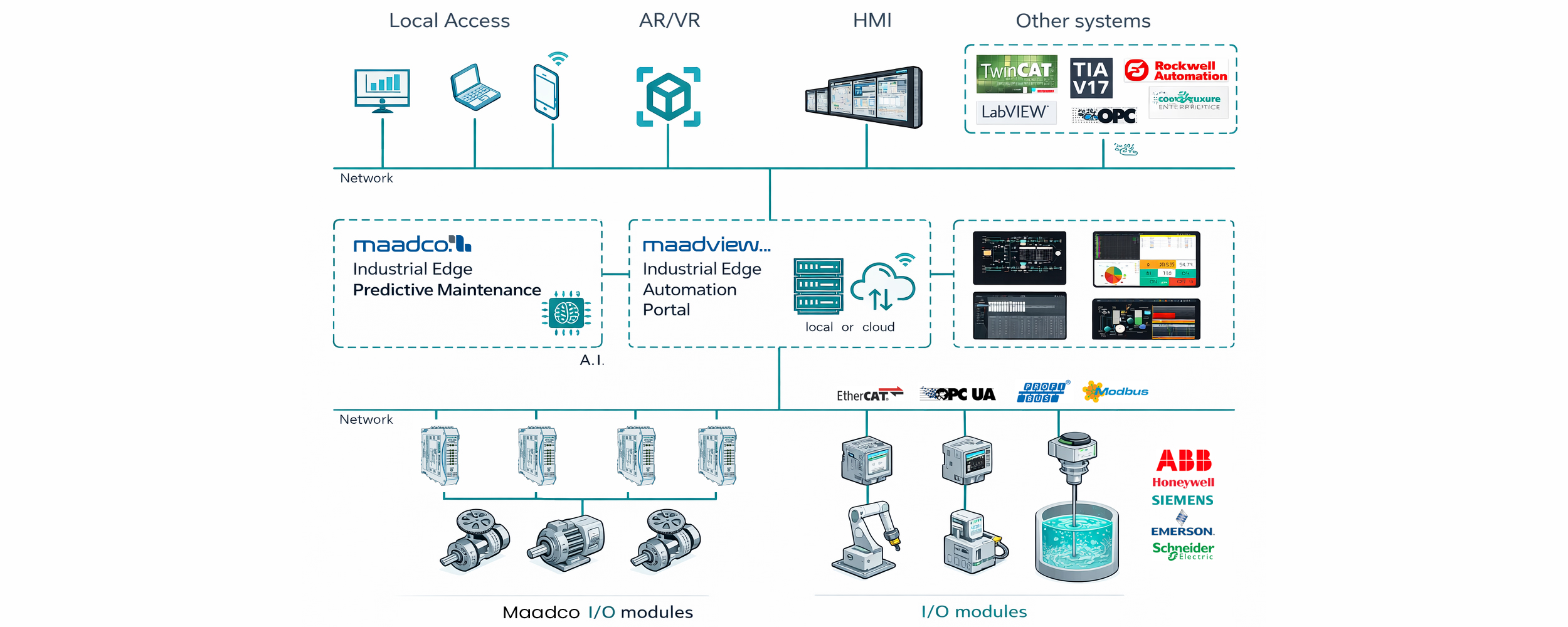
MaadView is server software that acts as the hub for everything on your plant floor, enabling total system integration. No matter what brand, model, or platform you use, it communicates with your plant-floor equipment just as naturally as it communicates with SQL databases, seamlessly bridging the gap between production and IT.
Some Brands We Work With
Quisque aliquet, libero consequat elementum convallis.







Our Core Technologies



Maadview Monitoring Software
Maadview Industrial Automation Portal
Maadview Software Package is a comprehensive and flexible solution for industrial data logger applications, industrial monitoring, and SCADA. Maadview software is fully compatible with Maadview industrial monitoring and SCADA hardware, such as the Series 7AP modules, and can connect to equipment and hardware from other well-known companies worldwide, including Siemens, Omron, ABB, and others.

maadview portal is a fully web based solution which is capable of being used in Industrial Monitoring and Datalogger Solutions
This Software is able to connect to our AP7 series APUs and collect data from different parts of an industry. We also can connect to other manufacturers via standard protocols such as OPCserver and Modbus.
This software has been developed in NAFUN team to server the Industry 4.0 needs by providing a cross platform and fully decentrelized solution.

Features
Maadview software’s Real-time Monitoring feature provides live, continuous visibility of your entire industrial process with data refresh rates as fast as under one second. Every sensor reading, equipment status, pressure, temperature, flow rate, vibration level, and energy consumption value is displayed on dynamic dashboards the moment it changes. Operators can watch animated process diagrams that move and update in real time, showing exactly what is happening in the field without any delay. When a value exceeds normal limits, visual indicators such as color changes from green to red, flashing icons, and audible alerts trigger instantly, allowing immediate response before a small issue becomes a major failure. The feature also includes real-time trending that plots live data on moving charts, so you can see exactly how a parameter is behaving right now. With support for multiple operator workstations and remote access, supervisors can monitor the plant from anywhere while engineers observe the same live data simultaneously. Real-time Monitoring transforms your control room into a living window into your process, giving you the power to react instantly, make informed decisions on the spot, and maintain complete control at every moment.

Maadview software’s Archiving feature automatically records every single data point from all sensors, meters, and equipment at configurable intervals, creating a complete and tamper-proof historical database of your entire industrial process. Unlike basic logging systems that only store alarms or events, our archiving captures continuous trends of temperature, pressure, flow, vibration, energy consumption, and equipment status with timestamp accuracy down to the millisecond. This historical data is instantly available for playback, trend analysis, and report generation, allowing you to compare current performance against any past period, identify recurring issues, optimize maintenance schedules, and investigate root causes of failures with precise detail. All archived information is compressed efficiently to save storage space without losing resolution, and can be exported to standard formats like CSV or Excel for further analysis. With this feature, you are no longer guessing what happened yesterday or last month; you have a searchable, reliable, and complete digital memory of your plant that empowers data-driven decisions and regulatory compliance.

Maadview software’s Event Management feature captures and records every significant operator action and system occurrence with precise timing and full detail in a secure, unchangeable database. This includes starting or stopping equipment, changing setpoints, acknowledging alarms, operator login and logout, communication losses, configuration changes, and device failures. Each event is stamped with exact time, date, user identity, source device, and a complete description. This comprehensive log allows you to reconstruct any incident minute by minute, verify operator accountability, debug process issues, and meet audit requirements for safety and quality standards. With instant search and filter capabilities, you can quickly find every event related to a specific piece of equipment, operator shift, or time window. Event Management turns your SCADA system into a complete forensic platform that leaves no question unanswered about what happened, when, and by whom.

Maadview software’s Device Manager feature provides a centralized interface for configuring, monitoring, and controlling all field devices connected to your industrial network, including PLCs, RTUs, smart sensors, drives, valves, analyzers, and communication gateways. From a single dashboard, you can view the real-time status of every device, check communication health, diagnose connection issues, upload and download configurations, perform remote firmware updates, and manage device parameters without needing to travel to the field or use multiple proprietary software tools. The Device Manager automatically detects new devices on the network, maintains a complete inventory with serial numbers and firmware versions, and logs every configuration change or communication interruption for audit purposes. When a device fails or goes offline, instant alerts notify operators with precise location and possible cause, while diagnostic tools help troubleshoot the issue remotely. This feature significantly reduces maintenance time, prevents configuration errors, ensures device compatibility, and gives you complete visibility and control over every intelligent device in your plant from one unified

Maadview software’s User Management feature gives you complete control over who can access your system, what they can see, and what actions they are allowed to perform. You can create individual user accounts with unique login credentials and assign each user to specific roles such as operator, supervisor, engineer, or administrator, each with precisely defined permissions. For example, an operator might be able to view real-time data and acknowledge alarms but not change setpoints or modify device configurations, while an engineer has full access to programming and system settings. The feature supports multi-factor authentication, password expiration policies, and forced password changes to enhance security, while automatic session timeouts log out idle users. Every login, logout, failed access attempt, and permission change is recorded in the event log for complete traceability. This role-based access control ensures operational safety by preventing unauthorized changes, helps meet regulatory compliance requirements like FDA, ISO, or NERC-CIP, and gives you peace of mind knowing that only the right people have the right level of access to your critical industrial processes.

Maadview software’s Backup and Restore feature ensures that your entire system configuration, historical data, event logs, alarm settings, user permissions, graphical displays, and device parameters are safely preserved and instantly recoverable in case of hardware failure, data corruption, or human error. With automated scheduled backups to local drives, network storage, or cloud locations, you never have to worry about losing weeks or months of critical process information. The restore process is simple and fast, allowing you to recover a single file, a specific device configuration, or the complete system to any previous point in time with just a few clicks. Unlike manual copying of files, which is prone to mistakes, our verification system ensures every backup is complete and error-free before finalizing. Whether you need to roll back after an incorrect configuration change, recover from a server crash, or duplicate your setup to a new facility, the Backup and Restore feature gives you complete peace of mind that your SCADA system can always return to a known working state without expensive downtime or data reconstruction efforts.


